Tutorial
Learn about the skills needed for creating apps
JSON | HTML/CSS | Data Modeling | Cliosight Basics | API
SQL (Structured Query Language)
SQL queries in Cliosight are used in
1. Admin console
2. Reports
3. Forms
4. Triggers
1. Beginner Level (Template #1 - Survey)
For fetching the count of responders who are either "Managers" or "Technical" professionals familiar with "Prompt Engineering"
SELECT COUNT(*) AS Total_Count, prompt_engg AS Prompt_Engg, job_role AS Job_Role

                FROM survey

                WHERE prompt_engg = 'yes' AND job_role IN ('Managerial', 'Technical')

                GROUP BY prompt_engg, job_role

                ORDER BY Total_Count DESC;
2. Intermediate Level (Template #4 - Auto Repair Shop CRM)
Listing all Job Cards in an Auto repair shop CRM
SELECT jc.id AS id,

    vd.id AS vehicle_details_id,

    cd.id AS customer_details_id,

    jc.job_date AS 'Job Date',

    vd.vehicle_number AS 'Vehicle Number',

    vb.name AS 'Vehicle Brand',

    vn.name AS 'Vehicle Name',

    vv.name AS 'Vehicle Variant',

    cd.name AS 'Customer Name',

    cd.phone AS 'Customer Phone',

    jcs.name AS 'Status',

    jc.estimated_amount AS 'Estimated Amount',

    jc.amount AS 'Amount'

FROM job_cards jc

LEFT JOIN job_card_statuses jcs ON jcs.id = jc.job_card_status_id

LEFT JOIN vehicle_details vd ON vd.id = jc.vehicle_details_id

LEFT JOIN customer_details cd ON cd.id = jc.customer_details_id

LEFT JOIN vehicle_variants vv ON vv.id = vd.vehicle_variant_id

LEFT JOIN vehicle_names vn ON vn.id = vv.vehicle_name_id

LEFT JOIN vehicle_brands vb ON vb.id = vn.brand_id

WHERE jcs.name <> 'Deleted'

    AND (DATE(jc.job_date) >= DATE({{fromDate}}) OR {{fromDate}} IS NULL OR TRIM({{fromDate}}) = '')

    AND (DATE(jc.job_date) <= DATE({{toDate}}) OR {{toDate}} IS NULL OR TRIM({{toDate}}) = '')

    AND (CASE WHEN "\{{jobStatus}}" = '"NULL"' THEN 1 ELSE jcs.name IN ({{jobStatus}}) END)

    AND (vd.vehicle_number = {{vehicleNumber}} OR {{vehicleNumber}} IS NULL OR TRIM({{vehicleNumber}}) = '')

    AND (cd.phone = {{phone}} OR {{phone}} IS NULL OR TRIM({{phone}}) = '')

    AND ({{vNumPhone}} IS NULL OR TRIM({{vNumPhone}}) = ''

        OR vd.vehicle_number LIKE CONCAT('%',TRIM({{vNumPhone}}),'%')

        OR cd.phone LIKE CONCAT('%',TRIM({{vNumPhone}}),'%'))

ORDER BY jc.job_date DESC

LIMIT {{startIndex}}, {{pageSize}};
3. Advanced Level (Template #5 - House Rental Management)
Within forms, queries are mainly used to process intermediate results rather than saving them to another temporary database table. For example, in the house rental template we will use the following to generate a rent receipt:
SELECT DATE_FORMAT(CONVERT_TZ(NOW(), 'GMT', 'Asia/Kolkata'), '%d-%m-%Y') AS 'current_date',


                  DATE_FORMAT(CONVERT_TZ(NOW(), 'GMT', 'Asia/Kolkata'), '%h:%i %p') AS 'current_time',

                  r.id AS id,

                  r.revenue_date AS revenue_date,

                  r.rent_amount_after_discount AS rent_amount_after_discount,

                  r.rent_previous_balance AS rent_previous_balance,

                  r.rent_paid_amount AS rent_paid_amount,

                  r.rent_balance_amount AS rent_balance_amount,

                  ri.start_date AS 'p_start_date',

                  ri.end_date AS 'p_end_date',

                  ri.electricity_minimum_charge AS electricity_minimum_charge,

                  ri.electricity_units_consumed AS electricity_units_consumed,

                  ri.electricity_free_units AS electricity_free_units,

                  ri.electricity_units_billed AS electricity_units_billed,

                  ri.electricity_unit_price AS electricity_unit_price,

                  ri.electricity_amount AS electricity_amount,

                  ri.water_minimum_charge AS water_minimum_charge,

                  ri.water_units_consumed AS water_units_consumed,

                  ri.water_free_units AS water_free_units,

                  ri.water_units_billed AS water_units_billed,

                  ri.water_unit_price AS water_unit_price,

                  ri.water_amount AS water_amount,

                  CASE WHEN ri.water_opening_reading = '0' THEN 'NA' ELSE COALESCE(ri.water_opening_reading, 'NA')
                  END AS p_water_opening_reading,

                  CASE WHEN ri.water_closing_reading = '0' THEN 'NA' ELSE COALESCE(ri.water_closing_reading, 'NA')
                  END AS p_water_closing_reading,

                  CASE WHEN ri.electricity_opening_reading = '0' THEN 'NA' ELSE
                  COALESCE(ri.electricity_opening_reading, 'NA') END AS p_electricity_opening_reading,

                  CASE WHEN ri.electricity_closing_reading = '0' THEN 'NA' ELSE
                  COALESCE(ri.electricity_closing_reading, 'NA') END AS p_electricity_closing_reading,

                  c.name,

                  i.name AS inventory_name,

                  ri.price_after_discount

                  FROM revenue_items ri

                  LEFT JOIN revenues r ON r.id = ri.revenue_id

                  LEFT JOIN clients c ON c.id = r.client_id

                  LEFT JOIN inventories i ON i.id = ri.inventory_id) iform;
In triggers, SQL queries are used to check conditions before executing an update query. For example,
Trigger Condition query: SELECT ('{{old_row.stage}}' <> '{{new_row.stage}}') as 'condition'
Trigger Action query: INSERT into contacts_scd (email, stage, start_datetime) VALUES
                  ('{{new_row.email}}', '{{new_row.stage}}', '{{current_datetime}}')
JSON (JavaScript Object Notation)
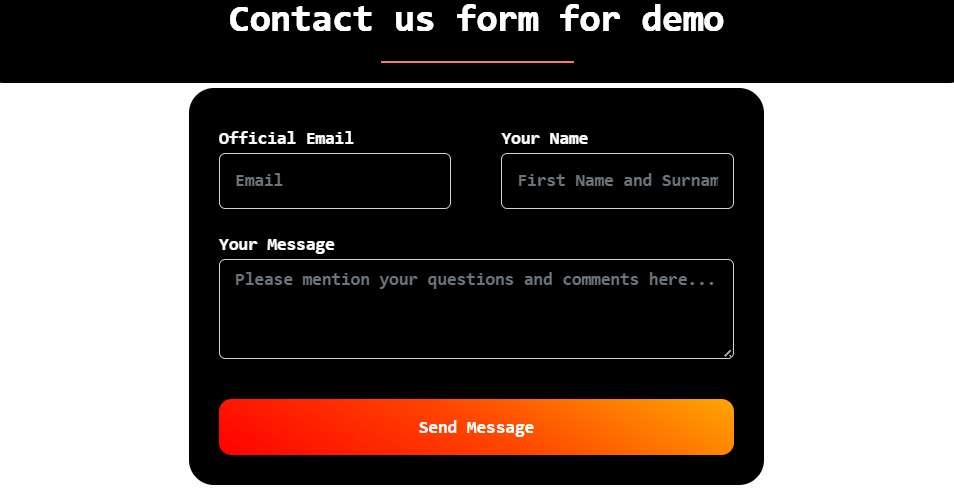
Below is the JSON config of a "Contact us" form. Although it is fairly simple, it shows the general hierarchical structure seen in JSON. A drop down menu can have hardcoded or column values retrieved from a report. Similarly, system parameters such as "logged-in user" and "timestamp" etc. can be added at the end of the config as hidden columns for metrics along with other user-defined fields like "source".
{

  "code": "new_website_signup",

  "client_id": 2,

  "description": "Website Tutorial",

  "table": {

    "name": "customer_queries"

  },

  "sub_form_definition": {

    "css_definition": "",

    "is_public": {

      "status": true

    },

    "pre_html": "Contact us form for demo",

    "inputs": [

      {

        "input_category": "field",

        "pre_html": "",

        "cols": 6,

        "column": { "Field": "email" },

        "input_type": "text",

        "input_label": "Official Email",

        "placeholder": "Email",

        "validation": { "isRequired": "1", "maxLength": 255 },

        "value": ""

      },

      {

        "input_category": "field",

        "pre_html": "",

        "cols": 6,

        "column": { "Field": "fullname" },

        "input_type": "text",

        "input_label": "Your Name",

        "placeholder": "First Name and Surname",

        "validation": { "isRequired": "1", "maxLength": 255 },

        "value": ""

      },

      {

        "input_category": "field",

        "column": { "Field": "post_body" },

        "input_type": "textarea",

        "input_label": "Your Message",

        "placeholder": "Please mention your questions and comments here...",

        "validation": { "isRequired": "0", "maxLength": 1000 },

        "value": ""

      },

      {

        "input_category": "field",

        "column": { "Field": "source" },

        "hidden": true,

        "input_type": "text",

        "input_label": "",

        "placeholder": "",

        "validation": { "maxLength": 255 },

        "value": "Website"

      },

      {

        "input_category": "field",

        "column": { "Field": "timestamp" },

        "hidden": true,

        "input_type": "",

        "input_label": "",

        "placeholder": "",

        "datepicker": true,

        "timepicker": true,

        "format": "m/d/Y H:i",

        "step": 30,

        "validation": {},

        "update_value": "{{current_datetime}}",

        "update_on_update": true

      }

    ],

    "last_insert_id_key": "id",

    "submit_button_label": "Send Message",

    "code": "new_website_signup",

    "description": "Website Tutorial"

   },

                     "mc_users": [8],

                     "mc_groups": [1,2],

                     "datasource_id": 1,

                     "workspace_id": "5"

}
Below is a report config from the Revenue and Expenses template. It has column links, multiselect
filters and HTML tags.
                {

  "datasource_code": "main_datasource",

  "multiple_statements": true,

  "pre_html": "<h1>Awesome Report</h1>",

  "post_html": "<h4>End of Report</h4>",

  "is_public": {

    "status": true

  },

   "default_view": "chart",

   "default_chart_view": "line",

  "css_definition": "@import url(https://fonts.googleapis.com/css?family=Quicksand);.btn,.form{}...",

  "page_size": 10,

  "columns": {

    "id": { "hidden": true },

    "name_phone": { "hidden": true },

    "from_date": { "hidden": true },

    "to_date": { "hidden": true },

    "name": { "alias": "Client", "links": [] },

    "phone": { "alias": "Phone" },

    "amount": {

      "alias": "Amount",

      "text-align": "right",

      "links": [{

        "type": "report",

        "code": "revenue_details_by_date_client_inventory",

        "args": [ ... ],

        "label": "View Itemized Revenues"

      }]

    },

    "paid_amount": { "alias": "Paid Amount", "text-align": "right" },

    "balance_amount": { "alias": "Balance Amount", "text-align": "right" },

    "tax_amount": { "alias": "Tax Amount", "text-align": "right" },

    "quantity": {

      "alias": "Quantity",

      "text-align": "right",

      "links": [{

        "type": "report",

        "code": "revenue_details_by_date_client_inventory",

        "args": [ ... ],

        "label": "View Itemized Revenues"

      }]

    }

  },

  "filter_menu": [

    { "label": "From", "column": "fromDate", "type": "value", "datepicker": true, "format": "d-m-Y" },

    { "label": "To", "column": "toDate", "type": "value", "datepicker": true, "format": "d-m-Y" },

    { "label": "Inventory Type", "column": "inventoryTypeId", "report_code": "inventory_types_filter", "name": "id", "column_label": "name", "term_column": "name", "multiple": true },

    { "label": "Inventory", "column": "inventoryId", "report_code": "inventories_filter", "name": "id", "column_label": "display_name", "term_column": "display_name", "multiple": true },

    { "label": "Client Name/Phone", "column": "clientId", "report_code": "clients_filter", "name": "id", "column_label": "name_phone", "term_column": "name_phone", "multiple": true }

  ]

                }
HTML and CSS
HTML/CSS are used in the following ways:
HTML: "pre_html", "post_html" tags in the JSON body for forms, reports, and pages. "export_html" in a form for generating documents like invoices, receipts, letters, etc.
CSS: "css_defintion" tag for forms, reports, pages and applications.
The following is an example of an export HTML, where the variables in {{}} are replaced by actual values at the time of export.
Cliosight
Electronic Invoice
Customer support: +91-8861651562
Date: {{revenue_date}} Customer Name: {{name}}
Shopping Items:
| Sl. No. | Item | Unit Price | Tax Rate | Quantity | Item Total | Discount | Total After Discount | Total Tax |
|---|
Amount Payable: Rs.{{amount}}
Thank you for using Cliosight.
Data Modeling
The following section explains how data modeling for the "Survey" template
was done in Cliosight. Once this model is understood, we will move on to the next template—"Project
Issue
Tracking".
Survey Application
There the three data apps in the Survey template:
Survey Interest App
Survey App
Admin App
All of them have different login credentials shared through some communication channel like a
closed whatspapp group or email. In more practical scenarios, only the forms are shared with the
audiences.
As discussed in the Features, data may flow from other sources as well, like
CSV imports, APIs or cloud data management services.
These apps can be hosted on different subdomains like survey.cliosight.com, survey-main.cliosight.com and
survey-admin.cliosight.com in this example.
The Survey Interest App is designed to collect and analyze responses from potential respondents. Based
on some specific criteria—such as skills, and past professional
experience, we shortlist a group of candidates to answer the Cliosight-specific questions in the main
Survey
form.
The Survey App is thus shared with the smaller group of shortlisted candidates.
Both apps
generate reports that
highlight some key insights about their responses.
The Admin App provides comprehensive reports containing the respondents’ personal information as well as
their
ratings on various product features.
Following is the component-wise break down:
1. Survey Interest App - a. Contact us Form - Landing page b. Survey Participation Form c. Dashboard for
Demographic Reports
2. Survey App - a. Cliosight Survey Form b. Dashboard for Detailed Survey Reports c. Template Demo
Videos
3. Admin App - a. Admin Dashboard
Within the "main_datasource" MySQL instance, the survey database contains the following tables:
1. survey_interest
2. survey
3. products
4. skills
5. modules
6. respondent_cities
7. respondent_databases
8. respondent_templates
9. respondent_suggestions
10. products_survey_interest
11. products_survey
12. skills_survey
13. functional_jobs
14. technical_jobs
15. managerial_jobs
In the list above, 'survey_interest', 'survey', 'products', 'skills',
'modules' and 'respondent_suggestions' are the primary objects across all three apps.
'respondent_cities', 'respondent_databases' and 'respondent_templates' are for
multiselect via checkboxes.
While, 'products_survey_interest', 'products_survey' and 'skills_survey' are for
data collected via multiselect dropdown menus. Both contain the primary key ids from either the
survey_interest or survey table.
'functional_jobs', 'technical_jobs' and 'managerial_jobs' are subform tables that
contain a reference from the parent table - survey_interest.
Assumptions of the design
1. Recent work experiences can only be in the same category. There is no way to include a
mix of technical, functional and managerial experiences.
2. All input fields accept alphanumeric characters. There is no strict type checking for valid format
in phone number, email or URL.
Once we add automation, the following can be included:
3. An email can be sent to the respondent on being chosen for the second round.
4. An email can be sent to the admin on every new submission in either form.
5. A reminder email can be sent to respondents who have not yet completed the survey within a stipulated
time.
Once we add AI features, the following can be included:
6. Automatic selection of respondents for the next survey based on their skills, tools used and past job
roles.
7. Emailing the selected candidates with a unique email verification code and link to the detailed
survey form.
8. Generating a summary of key insights along with future trends in data management.
9. Recommending personalized follow-up actions for respondents based on their ratings.
Project Issue Tracking Application
The Project Issue Tracking application is a dashboard for bugs, defects, project requirements and team
details maintained by a group of software professionals, lead by a project manager.
In this template, we have distinctively categorized each SPA into "Forms", "Reports" and "Charts" for
simplicity. Under each we have a SPA either for "Project Managament" or "Team Management".
In the "main_datasource" MySQL database, there is the "project_issue_tracking" database. The tables
created were:
1. pit_projects
2. pit_project_project
3. pit_internal_projects
4. pit_consultation_projects
5. pit_project_links
6. pit_project_requirements
7. pit_requirement_requirement
8. pit_project_project_requirement
9. pit_contacts
10. pit_groups
11. pit_contact_groups
12. pit_project_contacts
13. pit_project_groups
14. pit_project_requirement_contacts
15. pit_project_requirement_groups
16. pit_contact_managers
17. pit_employees
18. pit_cities
19. pit_contact_cities
20. pit_absence_records
21. pit_absence_record_contacts
22. pit_absence_record_managers
23. pit_files
In the list above "pit_projects", "pit_project_requirements", "pit_contacts",
"pit_groups" and
"pit_files" are the main objects for project management and team management. Rest are auxiliary.
For instance, "pit_internal_projects"
and "pit_consultation_projects" are for the two possible types of
projects in subforms.
As seen in the previous example, there are tables connecting two or more related entities in different
categories - projects, project requirements, contacts and groups.
For example, "pit_project_project_requirement", "pit_contact_groups",
"pit_project_contacts", "pit_project_requirement_groups" etc.
Assumptions of the design
1. A "Project" can have multiple requirements and associated projects. A "Project Requirement" similarly
can
be associated with multiple projects and other requirements for tracking dependencies.
2. For a Project with Project Requirements, the users creating them may be different. Hence their
related
entities may not be identical.
3. A project team is composed of employees, clients, contract workers, business partners and other
stakeholders who might assume a managerial role.
4. A Team Member Contact is a record maintained by the project manager for co-ordinating with the team
while
assigning tasks.
5. A team member may belong to multiple Groups and report to more than one manager.
6. Files uploaded through any of the forms can only be plain text files, PDFs, images or videos of
certain
minimum/maximum size and resolution if applicable. Multiple file upload is not supported.
7. Data uploaded through the import functionality in forms is also restricted to a maximum size.
Once we add automation, the following can be included:
8. A supervisor will be notified
when someone files for leave. Similarly, on approval or rejection the team member will
receive an update.
9. Monthly salaries (or payouts for freelancers) can be calculated for Employees, Freelancers or
Contract workers based
on the project manager's decision to make deductions against a leave. The final payslips can be delivered in bulk through email at the end of every month or scheduled dates.
Once we integrate AI features, the following can be included:
10. Automatic assignment of tasks to team members based on their past performances, skills and
availability.
11. Predictive analysis of project timelines with potential bottlenecks based on historical data.
12. Automatic generation of quarterly performance reports for team members based on their task completion
rates and their managers' feedback.
13. Daily summaries of pending tasks, reported bugs and upcoming deadlines sent to team members and
their supervisors via email or messaging apps.
14. A motivational leaderboard showcasing top performers in the team based on various metrics.
If you would like to see another example that demonstrates the use of diagrams, this video can be a good start.
Cliosight Basics
Fundamental Elements | Forms | Reports | SPA | Application | Automation
1. Introduction to the platform
Cliosight's data application builder is a simple tool to help in collecting, processing and sharing data.
2. Datasources, Tables, Users/Groups, Workspace
Below is the database connection definition for a MySQL server hosted on an EC2 instance in AWS.
                {

                    "code": "aws_ec2_mysql",

                    "client_id": 2,

                    "datasource_definition": {

                    "type": "mysql",

                    "dedicatedPool": true,

                    "connectionLimit": 10,

                    "host": "54.152.235.185",

                    "port": 3306,

                    "user": "cliosight",

                    "password": "password1234!",

                    "database": "cliosight",

                    "multipleStatements": true,

                    "label": "My Aws Mysql (Dedicated Pool)",

                    "code": "aws_ec2_mysql"

                    }

                }
3. Forms
Forms can be created by specifying the 1. Name 2. Code 3. Description 4. Workspace 5. Config 6. Export HTML/CSS and 7. Groups and Users An example of the config can be seen in the "Contact us" form example given above in the tutorial for JSON. Importing data through a form provides the flexibility to match the fields in the CSV file to the corresponding database table columns.
4. Reports
Reports can be created by specifying the 1. Name 2. Code 3. Description 4. Workspace 5. Query 6. Config
and 7. Groups and Users.
An example is given below from the Project Issue Tracking template where we are displaying the total
number of contacts for each
group, along with other details:
                Name: Groups with Total Contacts

                Code: groups_total_contacts

                Description: A report for listing all groups with their details and contacts.

                Workspace: Project Isssue Tracking

                Query:

                  select min(g.id) as group_id, min(g.name) as Name, min(g.admin_email) as 'Admin Email', count(gc.id)
                  as 'Total Contacts' from `groups` g
                  left join `groups_contacts` gc on gc.group_id = g.id group by g.id

                Config:


                  {

                     "datasource_id": "1",

                     "is_public": {

                     "status": true

                  },

                     "default_view": "table",

                     "default_chart_view": "bar",

                     "css_definition": "",

                     "columns": {

                     "group_id": {

                        "hidden": false

                  },

                     "Total Contacts": {

                        "text-align": "right",

                        "dropdown-menu-align": "right",

                        "links": [{

                            "type": "report",

                            "id": "37",

                            "args": [{

                            "report_column": "group_id",

                            "name": "group_id",

                            "label": "Group",

                            "label_column": "Name"

                      }],

                        "label": "View Contacts"

                         }]

                      }

                  },

                     "filter_menu": [{

                         "column": "Total Contacts"

                      }]

                  }


                Groups: Group1, Group2

                Users: testemail@email.com, admin_group1@email.com
5. SPA
The parameters of a SPA (Single Page Application) remains the same as a report. Only differences lie in the config. Several reports can be connected using global filters defined in a SPA. A SPA is private by default.
                  {

                      "is_public": {

                          "status": true

                      },

                      "css_definition": "",


                      "pre_html": "SPA 1",


                      "hideToolbar": false,


                      "post_html": "<h5>Copyright Cliosight 2026. All rights reserved.</h5>",

                      "widget_groups": [{

                          "widgets": [{

                              "id": "29",

                              "cols": 12,

                              "removeReportCss": false

                          }]

                      }, {

                      "widgets": [{

                          "id": "68",

                          "cols": 6,

                          "removeReportCss": false

                      }, {

                          "id": "37",

                          "cols": 6,

                          "removeReportCss": false

                      }],

                      "filter_menu": [{

                          "label": "Group",

                          "column": "id",

                          "column_label": "Name",

                          "report_id": 28,

                          "name": "group_id",

                          "reports": {

                             "37": {

                                  "report_column":
                  "group_id",

                                  "name": "group_id",

                                  "label": "Group",

                                  "label_column":
                  "Name"

                              },

                              "68": {

                                  "report_column":
                  "group_id",

                                  "name": "group_id",

                                  "label": "Group",

                                  "label_column":
                  "Name"

                              }

                          }

                      }]

                      }, {

                      "widgets": [{

                          "id": "86",

                          "cols": 12,

                          "removeReportCss": false


                          }]

                      }]

                  }
6. Application
The parameters of an application are as follows - 1. Name 2. Description 3. CSS and 4. Config. An
Application like a SPA, is private by default.
A public form or report placed in an application SPA therefore cannot be viewed without logging in.
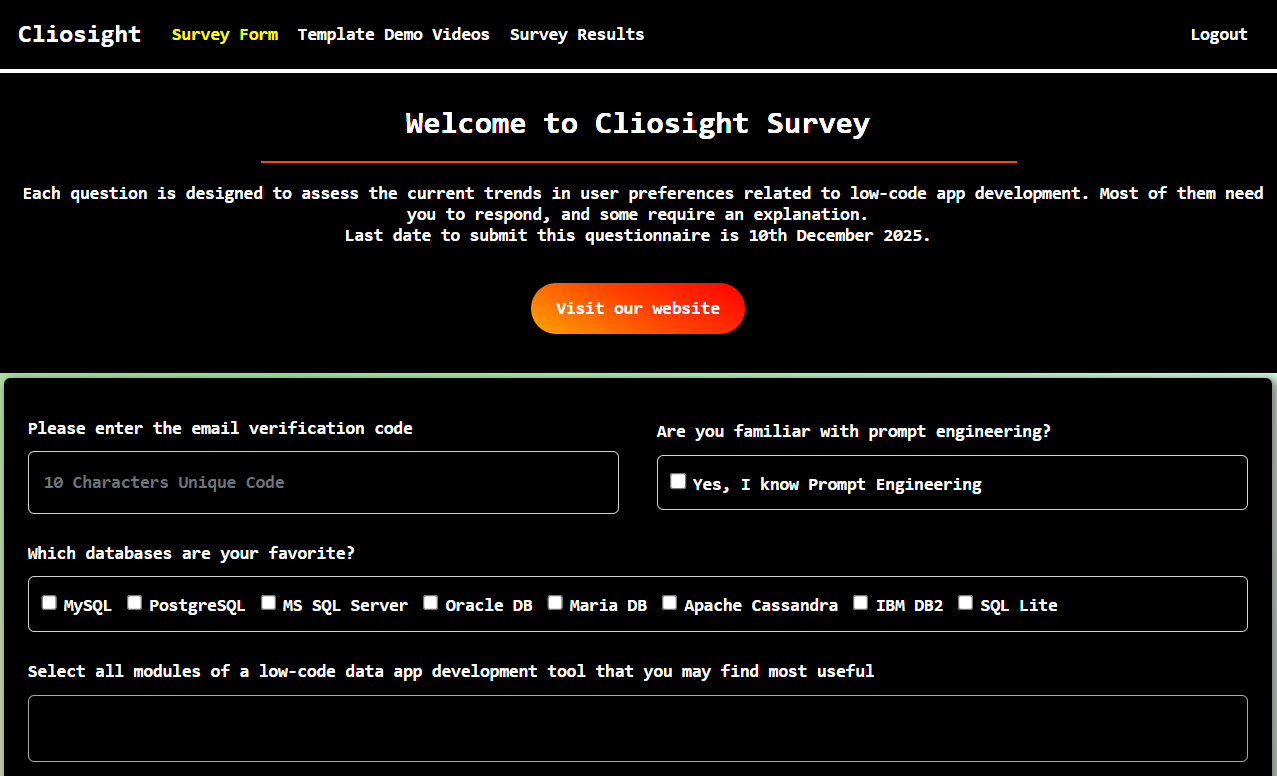
Below is the JSON for the "Survey" application:
                {

                       "default_page_id": "157",

                       "description": "For Template #1",

                       "nav_links": [

                        {

                              "label": "Survey Form",

                               "page_id": "157"

                           },

                        {

                               "label": "Template Demo Videos",

                               "page_id": "158"

                           },

                        {

                               "label": "Survey Results",

                               "page_id": "159"

                           }

                        ]

                }
7. Triggers and Jobs
A trigger and a job can be configured in a similar way but with only the name and the config. An example is the one given below that updates the stage of a "Contact" in the "Project Issue Tracking" template.
                {

                        "client_id": 2,

                        "trigger_definition": {

                                "trigger_type":
                "update",

                                "trigger_entity":
                "`contacts`",

                                "trigger_condition_query":
                "select ('{{old_row.stage}}' <> '{{new_row.stage}}') as 'condition'",

                                  "trigger_action_query":
                  "insert into contacts_scd (email, stage, start_datetime) values('{{new_row.email}}',
                  '{{new_row.stage}}', '{{current_datetime}}')",

                                  "label": "Existing Contact
                  stage scd open"

                          },

                         "datasource_id": 1

                  }
Cliosight API
Will be available later.
Some key API endpoints that will be given to developers are:
1. Authentication
2. Report Data Fetch
3. Report Creation
4. Form Submission
5. Data Import
6. User Management
7. Datasource Management
8. Automation Management
9. Datapipeline Management
10. AI Integration